
Download Flash Video Grabber – download videos, YouTube downloader, video grabber, free video download, browser-free, automatic URL capture, video converter
Overview
Flash Video Grabber is a lightweight, free utility application designed for Windows users seeking a straightforward way to download videos from online platforms. The app specializes in capturing video content from YouTube and other video-sharing websites, offering a streamlined process without requiring users to navigate through web browsers or manually copy URLs. Its primary purpose is to simplify video downloading by automating the detection and retrieval of video links, making it particularly useful for individuals who frequently save online content for offline viewing.
Target users include casual viewers, content archivists, educators, and anyone needing to preserve video material for personal or professional use. The app’s minimal footprint and lack of installation complexity make it accessible to users of all technical skill levels. Although the developer, Flash Video Grabber, has not provided detailed background information, the application has maintained relevance since its initial release in 2007, indicating a level of stability and user trust over time.
Real-world use cases include saving tutorial videos, educational lectures, or entertainment content for offline access—especially in areas with limited or unreliable internet connectivity. Within the broader utility app ecosystem, Flash Video Grabber occupies a niche role as a browser-independent tool, offering a unique advantage by operating outside the confines of standard web environments. Its continued availability underscores its enduring utility in a digital landscape increasingly dominated by streaming services and content restrictions.
Key Features & Functionality
- Browser-Free Downloads: Flash Video Grabber operates independently of web browsers, allowing users to download videos directly from the active video stream without launching a browser. This reduces system overhead and streamlines the workflow, especially for users who prefer minimal application switching.
- Automatic Address Capture: The app detects the current video URL in real time, eliminating the need for manual copying and pasting. This feature ensures accuracy and efficiency, particularly when dealing with multiple downloads or time-sensitive content.
- Format Conversion: After downloading, videos can be converted to WMV format, enhancing compatibility with older media players and devices that may not support modern video codecs. This is especially beneficial for users working with legacy systems or specific software requirements.
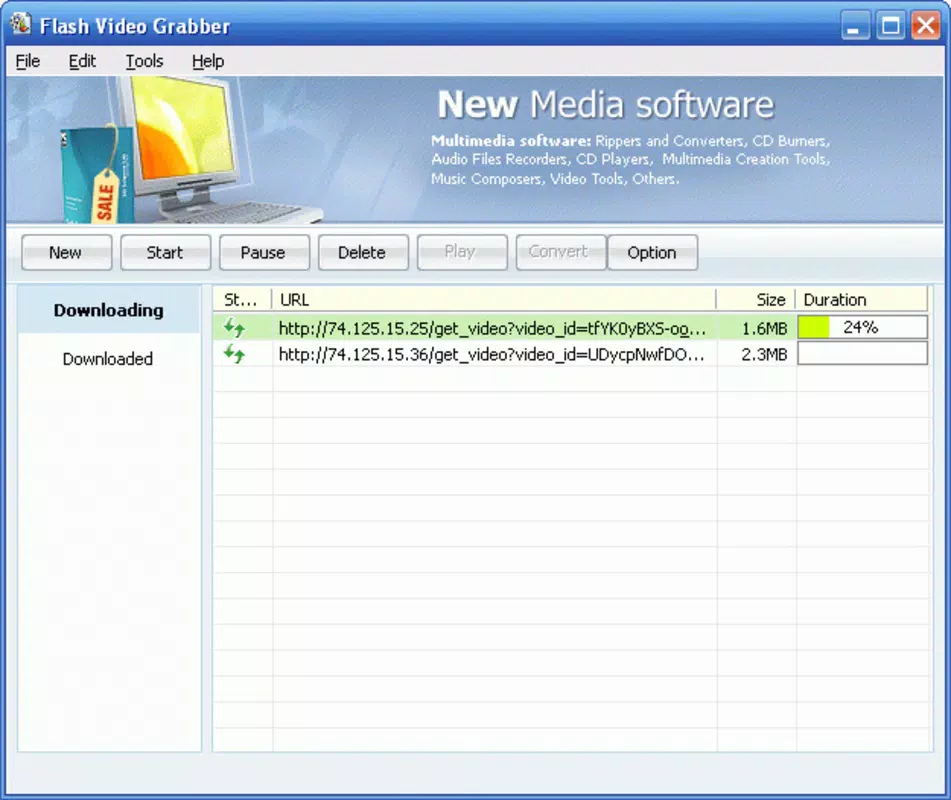
- User-Friendly Interface: The application features a clean, minimal interface with essential controls clearly laid out. Even users with limited technical experience can navigate the app with ease, making it accessible to a broad audience.
- Compatibility with Multiple Platforms: While optimized for YouTube, Flash Video Grabber supports video extraction from other online platforms, expanding its utility beyond a single source. This versatility makes it a valuable tool for users managing content from diverse websites.
For example, an educator might use the app to capture a series of science demonstrations from various educational sites, convert them to WMV for classroom playback, and store them locally without relying on internet access during lessons. Similarly, a content creator could use it to archive reference videos for future projects, ensuring they retain access even if the original content is removed.
Interface, UX & Performance
Flash Video Grabber presents a minimalist interface with essential controls displayed in a compact layout. The design prioritizes function over aesthetics, focusing on clarity and usability. Navigation is straightforward, with primary actions—such as initiating a download or converting a file—accessible through clearly labeled buttons or icons. Users can start the process with minimal interaction, aligning with the app’s goal of simplicity.
Although the developer did not list formal performance metrics, the app’s small file size of 1.2 MB suggests efficient resource usage. It is likely to run smoothly on older Windows systems, contributing to its longevity. Responsiveness appears to be consistent, as the app captures URLs and processes downloads in real time without noticeable lag. Stability is implied by its continued availability since 2007, though no official update history is provided.
Performance on different device categories cannot be confirmed due to the lack of detailed specifications. However, the lightweight nature of the application suggests compatibility with low-end and mid-range systems. Users should expect minimal impact on system performance during operation, making it suitable for multitasking environments.
Platform Compatibility & Technical Requirements
Flash Video Grabber is designed exclusively for the Windows operating system. The current version is 2.0, with a file size of 1.2 MB. The developer did not specify minimum OS requirements or compatibility with specific Windows versions. As such, it is unclear whether the app supports modern Windows 10 or Windows 11 environments, or if it is limited to older systems.
Given its release date of 2007, the app may rely on legacy components or APIs that are no longer supported in newer Windows versions. Users are advised to test the application in their environment to confirm functionality. No information was provided about installation procedures, administrative permissions, or compatibility with 64-bit systems.
For users seeking to install the app, it is recommended to verify system compatibility and run the application in a secure environment, especially since it interacts with external video streams.
Pros and Cons
Pros
- Free to download and use, with no in-app purchases or hidden costs.
- Minimal file size ensures quick installation and low system resource usage.
- Browser-free operation reduces dependency on web environments.
- Automatic URL detection eliminates manual input errors.
- Supports video conversion to WMV format for broader compatibility.
Cons
- Compatibility with modern Windows versions is not confirmed.
- Developer did not provide detailed technical specifications or update history.
- No information on security practices or data handling during downloads.
- Interface design is basic and may lack modern visual appeal.
- Support for only one output format (WMV) limits flexibility.
FAQ
Is Flash Video Grabber safe to download and use?
The app is free and available without registration. However, since it interacts with external video sources, users should ensure they are downloading content in compliance with copyright laws and platform terms of service. Running the application in a secure environment is recommended.
Can I use Flash Video Grabber on Windows 10 or Windows 11?
Compatibility with Windows 10 or 11 is not confirmed by the developer. Due to its release date in 2007, the app may not fully support newer operating systems. Users should test it in their environment to verify functionality.
Does Flash Video Grabber support video formats other than WMV?
Based on available information, the app only converts downloaded videos to WMV format. No support for other formats such as MP4 or AVI was mentioned.
How do I install Flash Video Grabber?
As no installation process was detailed, users may need to run the application directly from the downloaded file. It is recommended to scan the file with antivirus software before execution.
Is there a mobile version of Flash Video Grabber?
Flash Video Grabber is designed for Windows only. No mobile versions for Android or iOS were provided in the available data.
Final Thoughts
Flash Video Grabber remains a niche yet functional tool for users who need a simple, browser-free way to download and convert online videos. Its core strengths—automatic URL capture, minimal system impact, and free access—make it a compelling option for those managing offline video libraries. While its age raises concerns about compatibility and security, its continued presence suggests a dedicated user base.
For educators, students, and content archivists who value efficiency and simplicity, Flash Video Grabber offers a practical solution. Its ability to bypass browser dependencies and convert content to a widely supported format adds tangible value. However, users should proceed with caution, especially on modern systems.
Download Flash Video Grabber now


